How Do I Find My Store ID?
How do I find the store ID for my restaurant or business?
Being able to identify your store ID can be helpful in expediting resolutions for support cases, especially when your business has multiple locations. When you call, chat, or email Support, you may be prompted to share your store ID to verify identity or location. There are two main ways to identify your store ID:
DoorDash Website (Store Link)
Pull up your store on DoorDash.com (on a browser) and navigate to the top of the page with the URL link. Your store ID will be the string of digits at the end of the link. The store ID in the example below has been highlighted.

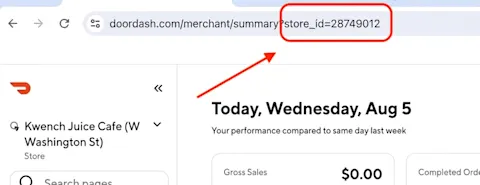
Merchant Portal
Log into the Merchant Portal. Your Store ID will be in the URL link at the top of the page. Any tabs you click into on the lefthand side will not affect the store ID in the link so you can view your store ID from any page within the Merchant Portal. The store ID in the Merchant Portal URL has been highlighted below.
If you need help with the Merchant Portal, including reseting your password and navigating through the Portal, please reference our What is the Merchant Portal? help page.



