SafeDash Reporting
Overview
With SafeDash Reporting, you can easily and quickly report any safety incidents while dashing or after from within the Dasher app. If you ever need immediate assistance in an emergency, you can call 911 and/or easily access SafeDash to quickly connect with a safety agent for assistance at your location.
Frequently Asked Questions
Q: How do you access SafeDash Reporting?
A: You can access SafeDash Reporting through the Dasher App by clicking on the help icon in the upper right-hand corner.

Q: How do I submit a safety report?
A: Select ‘Report a safety problem’ from the Help menu and follow the in-app instructions to provide more information, such as your “Reporting Reasons” and on which delivery the incident occurred.


Q: What happens after I submit a report?
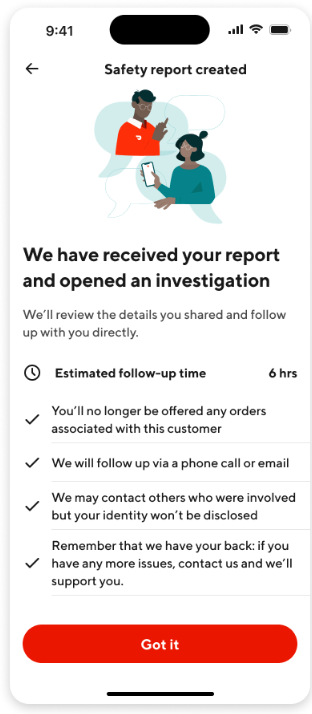
A: Once you submit a report, you will see a submission screen that lists potential next steps DoorDash may take, such as:
Following up via a phone call or email.
An estimated follow-up time.
If the incident was related to a consumer, you will no longer be paired with that consumer for future orders.

Q: What if it’s an emergency and I need assistance immediately?
A: To get immediate assistance in an emergency, you can call 911 and/or easily access SafeDash to quickly connect with a safety agent for assistance at your location.




