Dasher Guide to Taxes
Disclaimer: As an independent contractor, you are responsible for keeping track of your earnings and accurately reporting them in tax filings. DoorDash does not provide a breakdown of your total earnings between base pay, tips, pay boosts, milestones, etc. If you have any questions about what to report on your taxes, you should consult with a tax professional. DoorDash cannot provide you with tax advice nor can we verify the accuracy of any publicly available tax guidance online. Keep in mind: DoorDash does not automatically withhold taxes. We calculate the subtotal of your earnings based on the date the earnings were deposited. The subtotal is not based on the date you completed the dash. |
Table of Contents:
Dashers in the US
Dashers in Puerto Rico
Dashers in Canada
Dashers in New Zealand
Dashers in Australia
Dashers in the US
If you earned $600 or more between January 1 and December 31 on the DoorDash platform, you’ll receive a 1099-NEC form via the Dasher app.
To view, save, export, or print your 1099 PDF report, please follow the steps below, after ensuring you’ve downloaded the newest version of the Dasher app:
Step 1
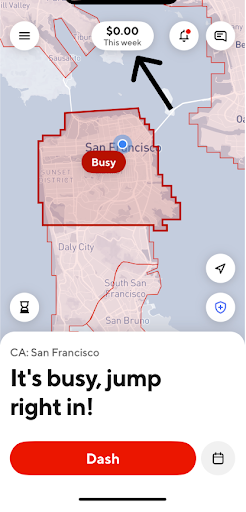
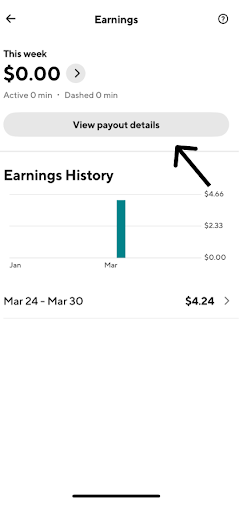
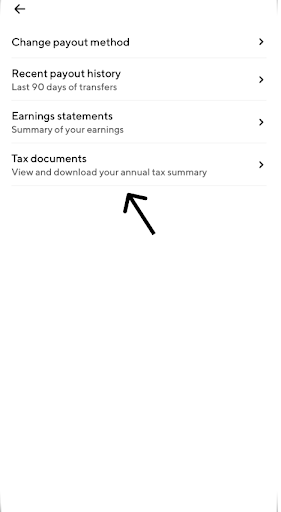
Simply tap on the earnings pill in the home screen to be taken to the Earnings tab in the Dasher app. Tap ‘View payout details’, then tap ‘Tax documents’.


Step 2
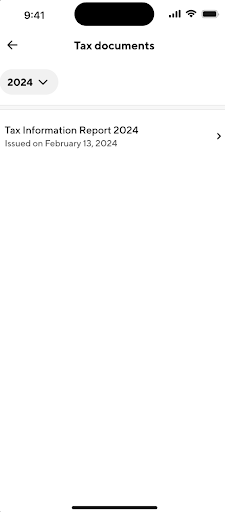
Use the dropdown to select the desired year.
The form for the selected year will appear (the earliest year you can select is 2024).

Step 3
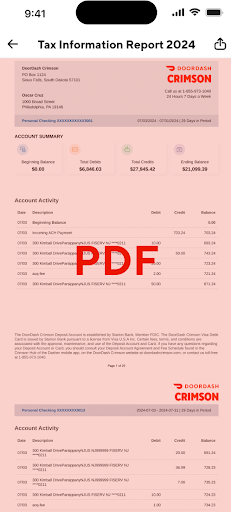
Tap on the form to display a PDF of the form.
Tap the share icon on the top right to share, save, or download the PDF.

If your Dasher account has been deactivated or you have any issues accessing or downloading your 1099-NEC form in the Dasher app, please contact DoorDash Support.
Important to keep in mind:
By December 31: Confirm your physical address is correct via the Dasher app by following the instructions below:
Log in to the Dasher app
Note: Please make sure you’re using the newest version of the Dasher app.
Navigate to add or update your address
For iOS users: On the Account tab of the Dasher app, tap 'Profile', then tap 'Edit profile details'.
For Android users: From the menu tab of the Dasher app, tap 'Account Details', then tap 'Edit Account Details'.
If adding your address for the first time, tap 'Add' next to Address. If updating your address, tap 'Update' next to the current address.
Fill in your address details under 'Where do you live?'.
Once you’ve confirmed your address, tap 'Continue', then 'Save'.
By January 31:
Your 1099 tax form will be available to download via the Dasher app.
If you choose to opt out of electronic delivery, you will receive your Form 1099 by mail in early February. It will be postmarked by January 31.
Note: Postal Service delivery by mail can take up to 10 business days and may be impacted by USPS service disruptions outside of DoorDash's control.
DoorDash will send the information contained on your Form 1099 to the IRS and relevant state tax authorities.
Due to recent No Tax on Tips changes (only for Dashers in the US), your DoorDash tip income will be reported separately from your 1099. You’ll receive this information via email from DoorDash by January 31.
If you need to request updates to your Name or TIN (SSN or EIN) on the 1099 tax form after January 31, or need to report an address change to a different state, contact DoorDash Support by clicking here.
Address changes occurring within the same state will not be adjusted on tax forms. If your address has changed, please update it via the Dasher app by following the instructions above.
April 15:
IRS deadline to file individual tax returns. You’ll need your 1099 tax form to file your taxes.
Frequently Asked Questions
Q: What is a 1099-NEC tax form?
A: 1099-NEC forms are federal income tax information forms used to report earnings and proceeds other than wages, salaries and tips (which are reported on the federal W-2 form). The forms are filed with the U.S. Internal Revenue Service (IRS) and, if required, state tax departments. A 1099-NEC form summarizes Dashers' earnings as independent contractors in the US. It’s provided to you and the IRS, as well as some US states, if you earn $600 or more during the year.
Q: What tax forms will be sent?
A: The only tax form that eligible Dashers will receive is the 1099-NEC, and this is ONLY for Dashers who earn $600 or more on the platform between January 1 and December 31. Dashers who earn less will NOT receive a 1099 form.
Q: How will tax forms be delivered?
A: By January 31, eligible Dashers who earned more than $600 during the year will be able to view, save, export, or print their 1099 PDF report from the Earnings tab of the Dasher app by tapping ‘View payout details’, then ‘Tax documents’, and using the dropdown to select the desired year. Please note that you will only receive a 1099-NEC if you earned $600 or more during the year.
Due to recent No Tax on Tips changes (only for Dashers in the US), your DoorDash tip income will be reported separately from your 1099. You’ll receive this information via email from DoorDash by January 31.
If your Dasher account has been deactivated or you have any issues accessing or downloading your 1099-NEC form in the Dasher app, please contact DoorDash Support.
Q: I don’t currently see any tax reports in the Dasher app. Why is that?
A: The report will be available in the Dasher app by January 31. If you earned less than $600 during the year, you won’t receive a tax report, as one is not required. If you do not see the ‘Tax documents’ feature, update to the newest version of the Dasher app.
If your Dasher account has been deactivated or you have any issues accessing or downloading your 1099-NEC form in the Dasher app, please contact DoorDash Support.
Q: How can I find my total tip earnings to claim ‘No Tax on Tips’ for tax deduction purposes?
A: Starting in 2025, Eligible taxpayers can claim this new deduction when filing their 2025 federal income tax return in early 2026. DoorDash will send an email notification reporting total tips earned in 2025 by January 31 to US Dashers active during the year.
Keep in mind that DoorDash does not provide you with tax advice. If you have any questions about your own taxes and what business-related expenses may be deductible, please consult a tax professional.
Q: How can I check my mileage for tax deduction purposes?
A: As an independent contractor, managing your own business and expenses can be tough. Your business-related mileage can be a significant expense, so if you know how many miles you drove, you may be able to reduce the amount you owe for taxes (or increase your refund). See here for an IRS publication on Standard Mileage Rates at a Glance.
DoorDash will send mileage estimate emails by January 31 to US & Canada Dashers active during the year who dashed by Car and had on-delivery mileage.
Keep in mind that DoorDash does not provide you with tax advice. If you have any questions about your own taxes and what business-related expenses may be deductible, please consult a tax professional.
Q: How do I update my tax information?
A: If you need to request updates to your Name or TIN (SSN or EIN) on the 1099 tax form after January 31, or need to report an address change to a different state, contact DoorDash Support by clicking here. Address changes which occurred within the same state will not be adjusted on tax forms. If your address has changed, please update it by following the instructions below:
Log in to the Dasher app
Note: Please make sure you’re using the newest version of the Dasher app.
Navigate to add or update your address
For iOS users: On the Account tab of the Dasher app, tap 'Profile', then tap 'Edit profile details'.
For Android users: From the menu tab of the Dasher app, tap 'Account Details', then tap 'Edit Account Details'.
If adding your address for the first time, tap 'Add' next to Address. If updating your address, tap 'Update' next to the current address.
Fill in your address details under 'Where do you live?'.
Once you’ve confirmed your address, tap 'Continue', then 'Save'.
Please note: If you opt out of e-delivery by January 10, 2026, we’ll automatically mail your 1099 tax form to the address on file. You can still contact DoorDash Support to update your information after January 31 and download your 1099 electronically. However, you will not be mailed a new paper copy of your 1099 tax form.
Q: How can I get my DoorDash earnings history?
A: Dashers do not need to calculate their earnings themselves — that will be clearly indicated on your 1099 form. However, you can view and download your monthly earnings statements on the Dasher App. Please click here for more information.
Note that reimbursements (e.g., if you paid for an offer with cash) are not included in 1099 earnings because reimbursements are not taxable.
Dashers in Puerto Rico
Important for Puerto Rico Dashers
If you live and work in Puerto Rico, you’ll receive Form 480.6SP from DoorDash. AII natural persons that receive payments for services rendered in Puerto Rico will receive a Puerto Rico Treasury Department Form 480.6SP. This form reports your delivery income directly to Hacienda (Puerto Rico’s Treasury Department), not the IRS. It should be reported on your Puerto Rico income tax return and replaces the U.S. Form 1099-NEC for local reporting.
What It Is
Form 480.6SP is issued by Hacienda to report income earned by independent contractors or self-employed individuals — including DoorDash Dashers in Puerto Rico. It’s the Puerto Rico equivalent version of Form 1099-NEC, showing how much you earned through DoorDash during the year. Form 480.6SP reports the payments received, on a calendar year basis, for the services rendered in Puerto Rico.
Who Gets It
If you completed deliveries in Puerto Rico during the tax year, DoorDash will issue you a Form 480.6SP for the calendar year. It shows your total earnings before any deductions or expenses (like gas, mileage, or phone costs).
How to Get Your Form
You can access your Form 480.6SP online through SURI — the Sistema Unificado de Rentas Internas portal from Hacienda.
Log in to your account
Go to “Print W-2PR Form and/or Informatives“ (Informative Returns)
Download your Form 480.6SP
Dashers in Canada
Dashers in Canada, please consult this article for further information.
Dashers in New Zealand
Dashers in New Zealand, please consult this article for further information.
Dashers in Australia
Dashers in Australia, please consult this article for further information.



