Dasher Safety FAQ
SafeDash
Overview
Your safety as a Dasher is a top priority — it’s essential that you’re always able to get help quickly when you need it. SafeDash™ is available when you are signed in to your Dasher app and is designed to provide access to assistance for safety-related situations that might arise while you’re dashing. Get to know the SafeDash™ features below, and check out our FAQs for more.
It’s all about peace of mind on the road, for every Dasher.
How SafeDash™ works:
Swipe for 000: Swiping to call 000, calls 000, and will share your location directly with emergency responders.
Use the Swipe for 000 feature for emergencies only.
For any non-emergency issues with your Dasher app, ratings, rewards, or earnings, please reach out to DoorDash support.

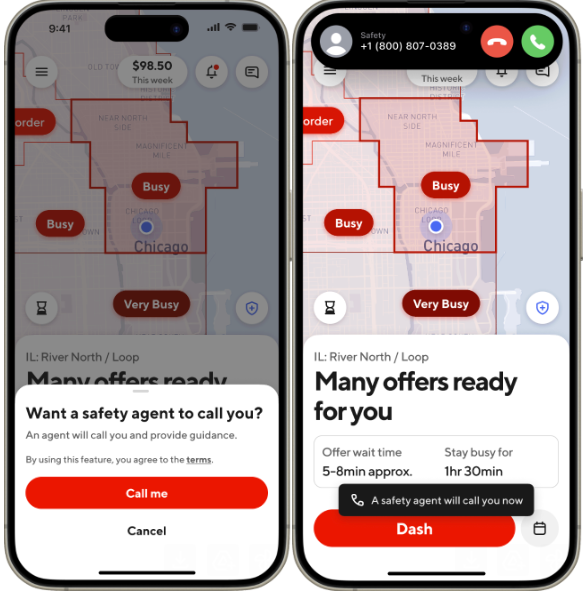
Talk to a Safety Agent: Though not every safety-related event requires emergency services, help is available to you — even during less critical situations. With this feature, you’ll get a callback from a trained safety agent in seconds for non-emergency situations. They’ll stay on the phone with you until you feel safe or request emergency services. DoorDash partners with trusted security platforms that can provide safety support 24/7.
You can use this feature to talk to a Safety agent if you need assistance, or for peace of mind while dashing.
For issues with your Dasher app, ratings, rewards, earnings, or general dashing issues, please reach out to DoorDash support.

Tap the links below to learn more about other available safety features:
Frequently Asked Questions
The following are a few frequently asked questions about SafeDash™:
Q: When should I use SafeDash™?
A: Use SafeDash™ if you’re concerned for your safety or experiencing a safety issue. It should not be used for general Dashing support. Available 24/7, SafeDash™ lets you share your location with trusted contacts, contact emergency services, or connect with a trained safety agent, all with just a tap of the blue shield icon. There may also be times when making a call is not an option. With just a tap or swipe, you can discreetly share your location and request help.
We hope every dash goes smoothly, but if you ever need support, help is at your fingertips.
Q: How does SafeDash™ work?
A: SafeDash™ gives you access to help when you need it. Just use any of the following options:
Swipe for 000: When you swipe for 000 in the driver app, DoorDash will request emergency services through its partner RapidSOS and immediately share your location with emergency services. The arrival time of responders (police, fire, or medical) to your location will vary, just like when dialing 000 directly.
Talk to a safety agent: Get an immediate call from a safety agent.
Q: I don’t see SafeDash™ or the safety features — where are they in the Dasher app?
A: You can find SafeDash™ when you’re signed in to the Dasher app. Simply tap the blue shield icon in the top right corner of the home screen, next to the Help button.

To help ensure full functionality, you’ll need to have the latest version of the Dasher app, which is available in Google Play and in the Apple App Store.
Q: If I lose connection while on a call with a safety agent, will I get a call back?
A: Yes. If your call gets disconnected while on the phone with a safety agent, the agent will attempt to contact you via call or text.
Q: My location changed after emergency help was sent out — will they still be able to find me?
A: The location you were at when you selected Talk to a safety agent is what the trained safety agent will share with 000. If you move locations, reply to the text message you received and update your location. Safety agents will try to communicate any change to emergency responders. If your chat with a safety agent has ended, tap Talk to a safety agent again to reconnect and share your updated location.
Q: What languages do safety agents offer support in?
A: Safety agents are currently able to assist Dashers in English; in addition, there is access to 150+ language lines.
Q: Where is SafeDash™ available?
A: Currently, SafeDash™ is available in the AUS markets.
Q: What happens if I no longer need assistance after using SafeDash™?
A: If you no longer need help, respond to the text message sent by the safety agent or initiate a new call using the Talk to a safety agent button to let them know.
Q: Do you share my personal information?
A: To get you help while you’re using SafeDash™, DoorDash will only share the following essential information with agents (and 000, if requested):
Name
Phone number
Vehicle information (if available)
Location is shared in near real-time for the duration of the response
To understand more about how your information may be used, please see our Privacy Policy.
Q: Will I be charged for using SafeDash™?
A: SafeDash™ is free to use, but many emergency services, such as ambulances, have separate costs which you are required to cover. Your phone’s carrier rates may also apply.
If you are injured while dashing, you may be eligible for coverage (see details here).
Q: Are there things I shouldn't use SafeDash™ for?
A: You should only use SafeDash™ for safety-related help while on a dash. For all other issues, please contact DoorDash Support. Our 24/7 Support team will be happy to assist you with any non-emergency issues.
Q: I see an error message when using SafeDash™ — what do I do?
A: If you need emergency help but are having issues with SafeDash™ for any reason, exit the app and dial 000 directly from your phone.
Didn’t see your question? We'd love to hear from you if you have any questions that we haven't been able to answer. Please fill out this form with any comments or suggestions for the team.



