Frequently Asked Questions: User-Generated Content
Who can leave content?
Why should I submit content on DoorDash?
How do I submit content (reviews, photos, videos, etc)?
What is the difference between “Everyone” and “Store feedback” when choosing who can see my review?
What is the difference between 👎 “didn’t like”, 👍“like”, and ♥️ “loved”? How are these ratings used?
How will you use my photos?
Can Merchants respond to my content?
What personal information is visible with my content?
Can I submit content anonymously?
What happens after I submit my content?
How long will it take for my content to be posted?
Why am I not seeing my content on a store page or profile?
My content abided by DoorDash’s Content Guidelines, but was not approved. Why?
Can I edit content?
Can I leave a review for the same store more than once?
Is leaving a review the same thing as reviewing my Dasher or Pickup Experience?
Am I eligible to earn DoorDash credit for high-quality food photos?
I submitted a photo. Where is my DoorDash credit?
How do I remove or report content?
How can I get help with my order?
Need help with something else?
Who can leave content?
Users must be signed into their DoorDash account in order to submit content.
Why should I submit content on DoorDash?
By sharing your love and honest feedback, you can help neighborhood merchants grow their businesses and help customers like you discover great food. Want to really help out your fellow customers and neighborhood stores? Add more details! The most helpful reviews mention specific things like items ordered and why you liked or disliked them and may include photos.
How do I submit content (reviews, photos, videos, etc)?
Content can be submitted on DoorDash by opening the mobile app or by going to www.doordash.com on a desktop. You can submit content directly from a store page, by filling out the prompt after your order, or from your order history.
To leave a review from a store page:
Click on a store
Scroll down to ‘Reviews’
Click the grey pencil icon to the right side to start a review
Select “Everyone” or “Store feedback” from the drop-down menu in the top right corner of the page
Select your rating and tap into the textbox to type your review
If available in your market, tap the plus sign below the text box to add photos or videos from your order either by uploading from your camera roll or accessing your camera. (Note: photo submission is not available on web)
Tap the ‘Submit’ button when complete
To submit only photos (no review) from a store page:
Click on a store
Scroll down to ‘Reviews’
Click on the add photo icon to the right side of ‘Reviews’
Add photos of your items

What is the difference between “Everyone” and “Store feedback” when choosing who can see my review?
When leaving a review of a merchant, you can choose “Everyone” or “Store feedback” in terms of who can see your review.
Everyone (previously referred to as “public reviews”) - Customers and merchants will be able to see your review and order items. These will be displayed on the merchant’s DoorDash store page and your consumer profile (if set to public) for other customers to reference.
Store feedback (previously referred to as “private feedback”) - Only DoorDash and this merchant will be able to see your review of their store. Ratings will still be included in the average store’s rating score. Review text will be shared directly with the merchant and DoorDash, is not visible to other customers, and will not appear on your consumer profile.

What is the difference between 👎 “didn’t like”, 👍“like”, and ♥️ “loved”? How are these ratings used?
The new ratings system is a simplified feedback system ("Didn't Like", "Liked", "Loved") and replaces the previous 5-star ratings system for restaurant orders. We encourage selecting the rating that most closely matches your experience with the restaurant.
👎 (“dislike”): poor experience
👍(“like”): good experience
♥️(“loved”): exceptional experience
The selected rating will be translated into a score for the restaurant and aggregated into their lifetime star rating.
How will you use my photos?
Photos that we approve will be displayed on the restaurant’s page and in your public profile. If you have also left a rating or review (which is not required), your photos will be displayed in connection with your rating or review.
At DoorDash, we are always looking for ways to enhance your experience. We may also display your photos on the restaurant’s menu and in other ways. As a reminder, any photos you submit are governed by our Consumer Terms and Conditions.
Can Merchants respond to my content?
Merchants may choose to provide a one-time response to reviews which DoorDash will share with you via email. In this case, DoorDash acts as an intermediary and your email address will not be shared with the Merchant. At this time, Merchant responses are not displayed publicly on store pages.
What personal information is visible with my content?
Both reviews made visible to “Everyone” or sent as “Store feedback” may include details such as your first name, last initial, and any items associated with a recent order from that merchant. At this time, there is not the option to submit a review anonymously. Private contact information such as your email address, phone number, or home address is not visible to Merchants.
Can I submit content anonymously?
No. To help ensure the authenticity of our reviews, both reviews made visible to “Everyone” or sent as “Store feedback” are displayed with the reviewer’s first name and last initial.
What happens after I submit my content?
Upon submitting, DoorDash will review your submission for adherence to DoorDash’s Content Guidelines. DoorDash will not edit, alter, or change your review in any way. Submitted photos may be lightly enhanced by DoorDash to correct issues such as blurriness or lighting. If approved, your content - including ratings, reviews visible to “Everyone”, and photos - will be displayed on the store page and on your public profile. Reviews set to “Store feedback” will be sent directly to the Merchant and DoorDash and will not appear on the store page or your profile.
How long will it take for my content to be posted?
Content and reviews shared with “Everyone” require approval. If approved, your content will be posted to the store page and your public profile approximately 1-5 business days after your submission. Reviews set to “Store feedback” will be sent to the Merchant and DoorDash immediately.
Why am I not seeing my content on a store page or my profile?
If you submitted a review visible to “Everyone” and are not seeing it on the store page or your profile, it could be due to one of the below reasons:
The store doesn’t have enough reviews. Reviews submitted for a store may not be publicly visible yet if the store has a low number of reviews.
It hasn’t yet been moderated by DoorDash.
It wasn’t approved to be published. Reviews are subject to approval. Reviews must be 25 characters or more in length to be published. Reviews that do not abide by DoorDash’s Content Guidelines will not be published. For example, non-relevant content may not ultimately be published or may be subject to removal. If your review is mainly related to issues with your delivery experience (which a Dasher is responsible for providing), it is considered non-relevant to the merchant’s business and will not be posted. Examples of this may include comments on food temperature or delivery time. This is to ensure that merchants do not receive negative reviews for any delivery issues that may have been outside of their control. Please fill out this form if your review has not been published and you believe an error has been made.
My content abided by DoorDash’s Content Guidelines, but was not approved. Why?
Content is subject to approval. Content that does not abide by DoorDash’s Content Guidelines, which disallow profanity as well as content that is threatening, harassing, racist, or sexist, will not be published. Please see DoorDash’s Content Guidelines for more information.
If your content did not meet the above criteria, it likely contained non-relevant content and therefore was not approved. For example, if your review or photo is related to issues with your delivery experience (which a Dasher is responsible for providing), it is considered non-relevant to the merchant’s business and will not be posted. This is to ensure that merchants do not receive negative reviews for any delivery issues that may have been outside of their control. For assistance on delivery issues, please contact our Support team directly in your DoorDash app or via this page.
Can I edit content?
At this time, reviews, including photos, cannot be edited. However, you may leave additional reviews and photos with your next review on the restaurant or request your review/photo be removed using this form.
Can I leave a review for the same store more than once?
Yes. Multiple reviews may be left for the same store; however, only one verified review can be associated with each order. Verified reviews are displayed with an “Ordered on DoorDash” tag and help us ensure that customer feedback is reflective of their experience ordering on DoorDash.
If you’ve only ordered from the store once, additional reviews will not be considered verified unless another order has been completed since your last review.
Is leaving a review the same thing as reviewing my Dasher or Pickup Experience?
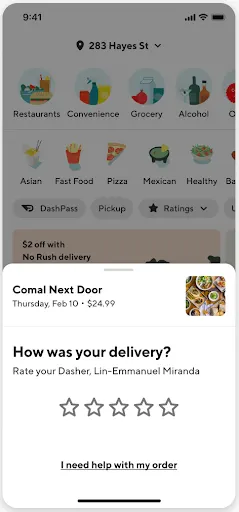
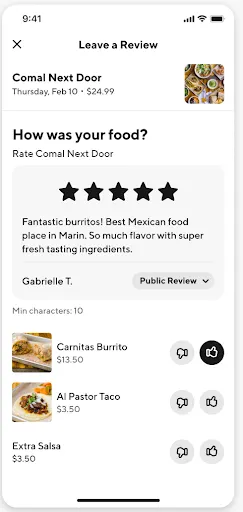
No, after a delivery order, you’ll be prompted to rate your Dasher (no written text) and, separately, rate or review the store. Only store reviews have the option to be made visible to Everyone.
Rate Dasher | Review Store |
|
|
Am I eligible to earn DoorDash credit for high-quality food photos?
Please see our Photo Incentives FAQ for more information about this program.
I submitted a photo. Where is my DoorDash credit?
Please see our Photo Incentives FAQ for more information about this program.
How do I remove or report content?
If you believe content does not meet DoorDash’s Content Guidelines, please use this form to report it to DoorDash.
How can I get help with my order?
If something went wrong with your order, please visit our support center.
Need help with something else?
Please visit our support center.



