DoorDash Crimson Cash Load
DoorDash Crimson Cash Load
Contact DoorDash Crimson Support by phone at 1-(833)296‑9399.
Everything you need to know about adding cash to your Crimson account at retail locations1
Getting Started
What is cash load?
Cash load lets you add cash to your Crimson account at over 60,000 retail locations — including Walmart®, CVS®, Walgreens®, Dollar General®, and more. Just scan the barcode from your DoorDash Crimson account and hand your cash to the cashier. Your money will land in your account typically within 20 minutes2.
Who can use cash load?
Cash load is available to DoorDash Crimson users. Whether you earn cash from DoorDash deliveries, tips, or any other source, you can use this feature to add cash into your Crimson account.
Where do I find cash load in the app?
Open the Crimson hub in your DoorDash app and tap “Cash load” under the “Discover more” section. You'll be taken to a store locator map showing nearby participating retailers.
Retail Locations
Which stores accept cash loads?
You can load cash at thousands of locations across the US, including:
Walmart®
CVS®
Walgreens®
Dollar General®
Family Dollar®
And many more participating retailers®
Use the store locator in your Crimson account within the Dasher app to find the nearest participating location, including store hours and distance.
How do I find a store near me?
Tap “Cash load” in the Crimson hub to open the store locator map. Each pin shows the store name, address, distance, and drive time. Tap any location to see details and start adding cash to your account.
Are all stores in the app guaranteed to accept cash loads?
The store locator only shows participating locations that accept barcode-based cash loads. If you run into any issues at a store, try another nearby location.
How It Works
How do I load cash into my Crimson account?
It's a simple 3-step process:
Step 1: Find a location: Open the Crimson hub, tap Cash load, and find a nearby store on the map.
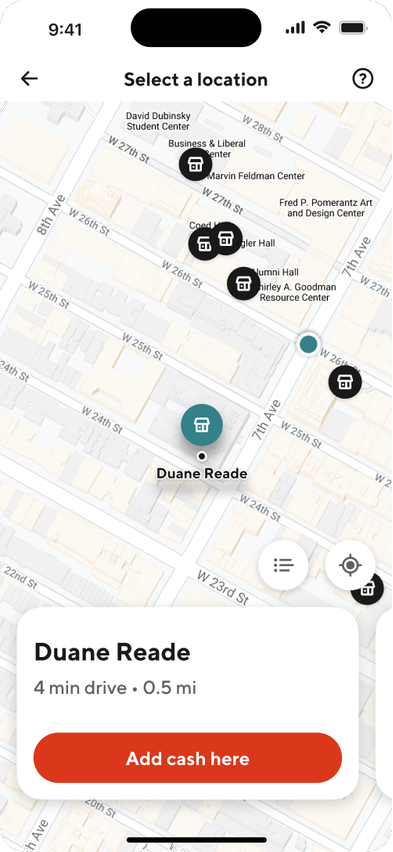
Step 2: Get your barcode: Tap 'Add Cash here' on any store. The app generates a unique barcode.
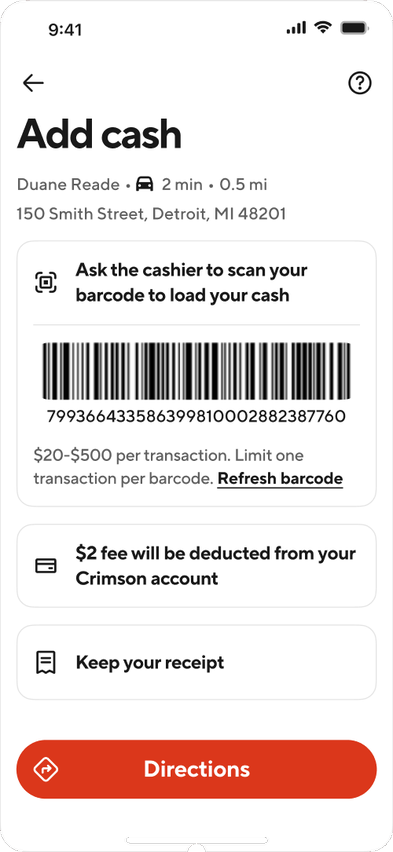
Step 3: Hand the cashier your cash: Show your barcode at the register and hand over your cash. The cashier scans the barcode to complete the cash load.


How long is my barcode valid?
Your barcode is valid for 60 minutes from the time it's generated and valid for only the specific retailer you selected. If it expires before you reach the register, tap Refresh barcode in the app to generate a new one.
Can I take a screenshot of my barcode?
No, screenshots of the barcode are disabled for security purposes. You'll need to show the barcode directly from the app at the register.
Will I know when my money lands?
Yes. You'll receive a notification and an in-app transaction record as soon as your money lands in your DoorDash Crimson account. Money will typically be available within 20 minutes.
Fees & Limits
Is there a fee to load cash?
Yes. There is a flat $2 fee per transaction which will be deducted from your account once your cash load posts. For example, if you hand the cashier $102, the full $102 will be added to your Crimson account. Once the cash load posts, the $2 fee will be deducted from your account balance. The fee is always shown before you generate your barcode, so there are no surprises.
What are the cash load limits?
The following limits apply to cash loads:
Per transaction: Load between $20 and $500
Daily limits: Up to 3 transactions or $1,000 total (rolling period)
Weekly limits: Up to 12 transactions or $3,500 total (rolling period)
Monthly limits: Up to 20 transactions or $4,000 total (calendar month)
Troubleshooting & Support
What if my money doesn't show up in my account?
Money typically will land in your account within 20 minutes. If it hasn't shown up yet, take a look at your transaction history in the Crimson app. If it's still missing, reach out to Crimson support. We'll investigate and get back to you within 72 hours.
What should I do if the store can't scan my barcode?
First, check to make sure your barcode is for the correct store location. If it is for the correct location and still isn’t working, try refreshing the barcode by tapping the Refresh barcode in the app. Still having issues? Try using a different register, visiting a nearby participating store, or contacting Crimson Support for assistance.
Can I view my cash load history?
Yes. All cash load transactions appear in your transactions list in the Crimson section of the DoorDash App including the date, amount loaded, fee charged, and store location.
Can I cancel a cash load after I've handed over my cash?
Once cash has been handed to the cashier and the barcode scanned, the transaction cannot be reversed. Make sure to confirm the amount and fee in the app before proceeding.
Who do I contact if I have a problem?
Contact Crimson support directly through the app. For cash load disputes or missing funds, our support team will open a case with Green Dot, our retail cash load partner, and follow up with you within 72 hours.
1 Limits may apply. Keep the receipt as proof of your transaction.
2 Money will typically be available within 20 minutes.
Service provided by Green Dot®. ©2026 Green Dot Corporation. All rights reserved. Green Dot Corporation NMLS #914924; Green Dot Bank NMLS #908739.
The DoorDash Crimson Deposit Account is established by Starion Bank, Member FDIC. The DoorDash Crimson Visa Debit Card is issued by Starion Bank pursuant to a license from Visa U.S.A. Inc. Certain fees, terms, and conditions are associated with the approval, maintenance, and use of the Deposit Account and Card. If you have any questions regarding your Deposit Account or Card, you should consult your Deposit Account Agreement and Fee Schedule found in the Crimson Hub of the Dasher mobile app, on the DoorDash Crimson website at doordashcrimson.com, or contact us toll-free at 1-855-973-1040. Starion Bank does not endorse or sponsor and is not affiliated with third-party products or services offered or advertised by DoorDash.
DoorDash Crimson Deposit Account Agreement
DoorDash Crimson Deposit Account Fee Schedule
DoorDash Crimson Starion Bank Privacy Notice
DoorDash Crimson Electronic Communications Agreement
DoorDash Crimson Rewards Terms & Conditions



