DashPass Lyft Partnership FAQs (Canada)
DashPass Lyft Partnership FAQs (Canada)
1. What is the Lyft & DashPass partnership?
a. All active DashPass members in Canada can link their Lyft account to their DoorDash account to enjoy exclusive rideshare benefits, on top of existing delivery benefits.
2. What benefits do I get with the Lyft x DashPass partnership?
a. Always-on benefits include:
1) Up to 4 discounted rides per calendar month:
10% discount for Lyft rides scheduled to and/or from the airport in Standard, Extra Comfort, XL, Black, and Black SUV modes
5% discount for on-demand Lyft rides in Standard, Extra Comfort, XL, Black, and Black SUV modes (excludes Wait & Save rides)
2 Priority Pickup upgrades per calendar month (unused upgrades expire at the end of each calendar month and do not roll over) when available.
For new DashPass members only: 3 months of DashPass, free. Eligibility requirements apply.
b. New Lyft riders who link their DashPass accounts get 50% off one Lyft ride, up to $10 CAD, valid for 30 days after linking accounts. This offer does not stack with other promotions and replaces any existing new user offers in the market.
3. How do I link my Lyft account to DashPass?
a. You can link your accounts at doordash.com/dashpass/partner/lyft
b.. Please ensure you click 'Confirm' on the 'Confirm linking your Lyft account to DoorDash' screen when linking your account.
4. Why do I see a blank screen when clicking on a Lyft Advertisement?
a. If you click on a Lyft advertisement banner on DoorDash and it leads you to a blank screen, please update your DoorDash app to the latest version. If the issue persists, update your Lyft app as well.
5. I've linked my account, but I'm not receiving the benefits. What should I do?
a. Ensure you clicked 'Confirm' on the 'Confirm linking your Lyft account to DoorDash' screen when linking your account at doordash.com/dashpass/partner/lyft.
b. For scheduled airport rides, the 10% discount applies to rides scheduled to and/or from the airport in Standard, Extra Comfort, XL, Black, and Black SUV modes. Wait & Save rides are not eligible for any discount.
c. If using a Business Profile, discounts don't apply automatically. To apply these discounts:
After the ride is completed, locate the "Rate and Pay" screen.
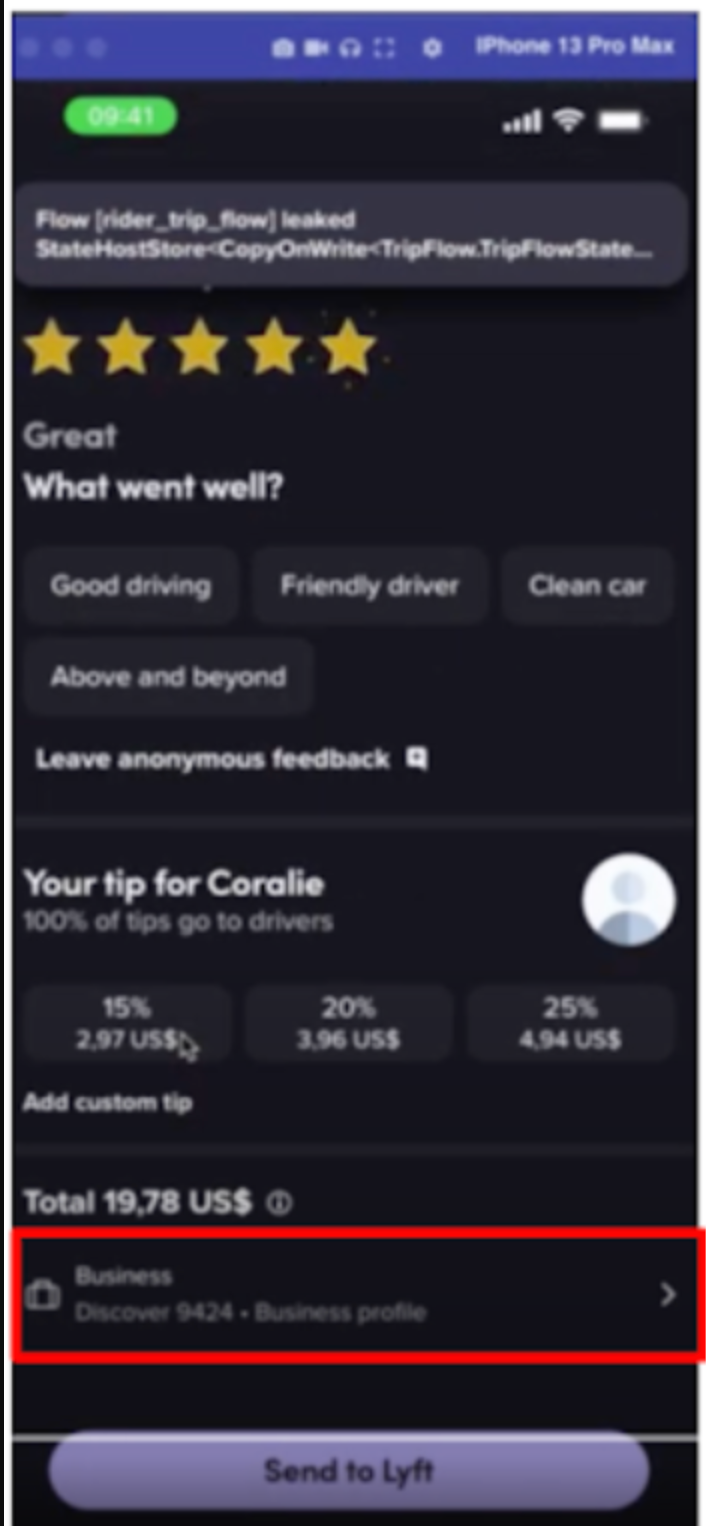
Tap on the section with the details of your payment setup (see circled in red above)
On the Payments screen, tap to change the applied benefits
Choose available benefits (0-10% off your next ride)
Tap on the back button
On the Payment screen, tap on Done
Observe that the coupon was applied on the Rate and Pay screen
Reach out to Lyft Customer Support if you need help or have additional questions.

d. For issues specifically related to Lyft rides or discounts, please contact Lyft Customer Support.
e. For questions about your DashPass account or the linking process, contact DoorDash Support.
6. What happens to my Lyft benefits if I cancel DashPass?
a. After you cancel your active, non-trial DashPass subscription, your Lyft benefits will be valid through the end of your current billing period. Thereafter, you will no longer be eligible for the Lyft benefits or any DashPass benefits. Please visit this article for more information on what happens to DashPass benefits when you cancel your DashPass and instructions for how to cancel your DashPass.
7. Is there a free trial available for DashPass after connecting my Lyft account?
a. Some consumers may be eligible for a free DashPass trial, which might include a three-month period through the Lyft partnership. If you meet the eligibility requirements, the offer will appear in your account. Eligibility is limited to consumers who are not current or past DashPass subscribers and have not had a free DashPass trial in the past 6 months. DoorDash may change the eligibility requirements for a free DashPass trial at any time without notice.
8. What happens if I unlink my Lyft and DoorDash accounts?
a. You can unlink your accounts here.
b. You can also unlink your accounts by going to Manage DashPass > Lyft Benefit > Manage Lyft Link > Unlink Icon Next to Lyft > Confirm Unlink.
c. If you unlink your Lyft and DoorDash accounts, you will no longer be eligible for any of the Lyft benefits.
d. If you unlink your Lyft and DoorDash accounts during the three-month free trial referred to above, then you will no longer be entitled to any Lyft benefits and will also be downgraded to a 30-day free DashPass trial. At the conclusion of that 30-day free trial, you will automatically be charged the then-current monthly DashPass membership fee (currently $[X.XX] CAD) plus applicable tax until you cancel. The DashPass membership fee will be charged to your preferred or any other payment method in your DoorDash account.
9. Do benefits apply to rides outside of Canada?
a. No, Lyft benefits through DashPass are currently available only to DashPass members in Canada and apply solely to eligible Lyft rides taken within Canada. Lyft benefits are not available for rides outside of Canada, and benefits do not travel or apply cross-border.



