Sales Report CSV Updates in Report Builder
Overview
Sales reports available in your DoorDash Merchant Portal through the Report Builder tool has been enhanced to make decision-making easier. Report builder offers a variety of reports depending on the DoorDash products your business uses. The changes to reporting may impact your internal tracking and processes due to the reorganization of columns and advanced filtering; continue reading to understand what is changing and how you can prepare.
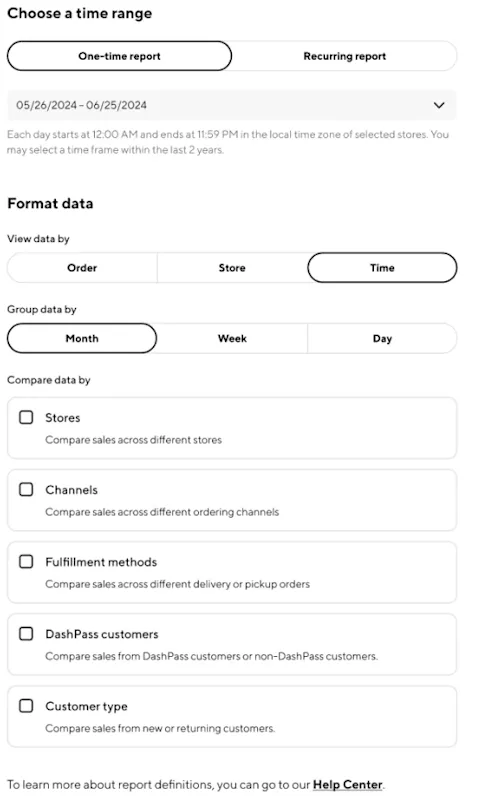
Sales reports in Report Builder will include the below enhancements to make the report easier to read and use. To access these reports, log in to Merchant Portal and select Create Report. Read more on how to use Report Builder in the Learning Center.
Sales reports:
Simplified setup in Report Builder
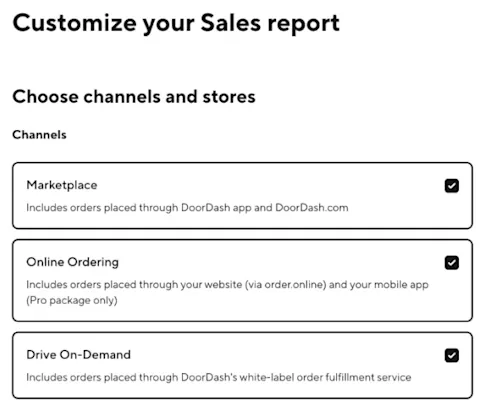
Multi-channel selection for all your DoorDash products (Marketplace, Drive & Online Ordering)
Reorganized columns specific to your business
Enhanced filtering
Preparing for this Change / Updating Internal Processes
As the changes may impact your internal tracking and processes, it is recommended that you make any necessary changes to your processes immediately to avoid any disruption. You will be able to switch between old and new versions of the sales report until August 29, 2026.
Best Practice for Updating Process
These steps are only required if you have existing automation or tracking that uses the current sales reporting CSVs downloaded from the report builder.
Open your downloaded sales report
Check out How to Log In to the Merchant Portal for access to the report builder
For more information on report builder, check out Make Strategic Business Decisions Using DoorDash Reporting.
Review the changes in column ordering, naming and new csv structure based on your selected data and filters.
If applicable, make any required adjustments to internal systems, internal CSVs/Sheets, or sales report ingestion to ensure an accurate transition to the new reporting structure.
If applicable, communicate/share the new reporting or column changes to any 3rd party systems that ingest reporting from Door Dash Report Builder.
To compare old and new versions, click the option to “Switch to previous version” in the blue banner, where you can download the same set of reports but with the previous structure.
FAQs
Q: What to expect with this update?
A: The updates to the sales report will simplify data format to better support your internal business tracking. You will be able to switch between versions of the reports to allow for comparison of the reporting changes until August 29, 2026. It is strongly recommended that you make the necessary changes to your internal processes as soon as possible.
Q: When will these changes come into effect?
A: These changes came into effect in early April 2026; you can continue to use the older version of these reports by opting out on the Report Builder page until August 29, 2026. Please make any changes to internal processes immediately to ensure no disruption to reconciliation or tacking.
Q: Why are my recurring reports still the old version
A: Due to the changes in formatting, it is recommended that you set up new recurring reports with the new experience as recurring reports using the old experience will not be available after August 29, 2026.
Q: Do I have to use the new reporting?
A: It is strongly recommended that you begin to use the new reports immediately, as the previous version will be deprecated on August 29, 2026.

Q: How can I see the old versions of reports, and how will I know I am using the old version of the reports?
A: You can switch between versions of reporting by clicking “Switch to previous version” on the blue banner on the financial report builder page until August 29, 2026. You will know you are downloading the old version of the reporting if you see a yellow banner on the financial report builder page.

Q: Why are these changes happening?
A: DoorDash is always looking for ways to improve the reporting experience. We are excited to bring more clarity to your sales reports.
Q: How will these updates affect my sales reporting processes?
A: The new format may impact the way that you currently track sales metrics because we are making adjustments to your downloadable sales CSV ie. Multiple Door Dash channels can be selected for the same report (Marketplace, Drive & Online Ordering) and additional filtering to allow for a more customized reporting experience. Check out How to Log In to the Merchant Portal to get access today.
Q: What reports are changing?
A: Formally, “View By” reports will be a single report that can be filtered based on your selection criteria, with all applicable channels selected as a default, modify selections as needed.
Q: What columns are changing?
A: The new sales CSVs report combines what previously were selected reports to allow for a more complete data review of your business. This means that previously individual columns separated by channel can now be combined into a single report. Each merchant's experience may vary based on their business, please review your new CSVs in the report builder.
Q: How do I know how my columns will be arranged in the downloadable CSV reports?
A: The columns that will appear in updated CSVs will be unique to your business and the filtering selected. Review your new CSVs in the report builder.
Q: Why have some columns been removed from the new reporting?
A: Financial reconciliation data like ad, promotion, and commission can be found in the financial reporting section in your merchant portal report builder. For more information on report builder and the reports available, check out Make Strategic Business Decisions Using DoorDash Reporting.
Q: How will these changes impact my tracking processes if I use an integrated partner or third-party platform?
A: As the columns in your downloadable CSV templates are changing, you may need to inform your integrated partner or third-party platforms about the changes made. If they are receiving the information from a recussing report, please create a new recurring report request using the updated csv formats.
Q: Will you be integrating these sales reports with POS systems?
A: We will not be integrating these sales reports with these systems at this time, but we are always assessing additional ways we can help improve your reporting processes.
Q: How will the CSVs change if I add a new DoorDash product, such as Online Ordering or Drive on Demand?
A: After you begin to accept orders using your new product (Online Ordering, Drive on Demand, etc), additional channel options will be available in your report builder selection.
Q: Who can access this information?
A: All Merchant Portal user types in the US, Canada, and Australia can access Report Builder and sales reports. For more information on user access, check out How to Log In to the Merchant Portal



