How are customer reviews collected and displayed?
Ratings & Reviews:
Helping customers discover your restaurant
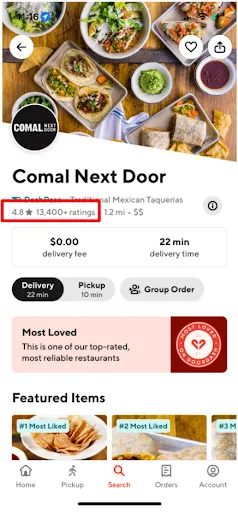
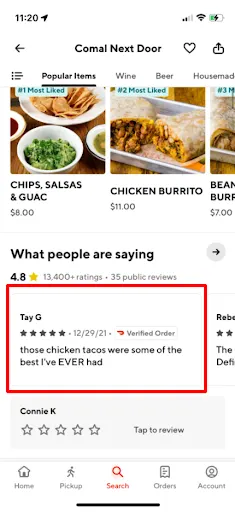
To help customers discover new restaurants and dishes on DoorDash, we launched public reviews and “most-liked” items on restaurant store pages in Australia. With these features, customers will now find trusted feedback and recommendations from fellow customers, helping them discover new favourites (and helping you build your customer base and order volume).
Store Rating | Public Review | Most-liked Items |
|
|
|
Jump Section
Public Reviews
Most-liked Items
Public Reviews on Restaurant Store Pages
FAQs
1. What’s a public review?
DoorDash customers will be given the option to submit a public review or private feedback for your store.
Private feedback is shared directly with you in Merchant Portal, and is not visible to other customers.
Public reviews are shared with you in Merchant Portal, but are also displayed on your DoorDash store page for customers to reference.
2. Who can leave a review?
Public reviews are currently available to DoorDash users markets in Australia.
Users with access to public reviews must be signed into their DoorDash account in order to leave a review. We'll proactively remind customers to leave a review after ordering from you to help provide you with feedback from those that know you best. Reviews for orders that have been placed on DoorDash will be displayed with a “Verified Order” label.
3. Where are public reviews displayed?
Public reviews will be displayed and visible to DoorDash customers on your store page under the header ‘What people are saying’, with most recent reviews shown first. Approved public reviews will be displayed on your store page.
4. What determines if a review is approved or denied?
All public reviews are moderated by DoorDash to ensure they meet Review Guidelines. This is to ensure that public reviews:
Abide by our terms and conditions, which disallow profanity, as well as content that is threatening, harassing, racist, or sexist.
Include content that is relevant to the customer’s experience with your restaurant, e.g. the quality of items ordered, portion size, value for price, etc. If a review is mainly related to issues with a delivery experience (which a Dasher is responsible for providing), it is considered non-relevant to your business and will not be posted. Examples of this may include comments on food temperature or delivery time. This is to ensure that you do not receive negative reviews for any delivery issues that may have been outside of your control.
5. How do I remove or report a public review on my store page?
If you believe a published review does not meet our Review Guidelines, please reach out to our Support team here. Merchants in Australia should use this form to report a public review to DoorDash for extra moderation.
6. How do I respond to a customer review?
You can respond to all public reviews and private feedback from customers in the Merchant Portal within 7 days of receiving it, with customisable responses and the option to include a discount promo for their next order.
Customers who receive a response to their feedback within a week are 5 times more likely to order again. While it's not required, responding to customers is an excellent way of showing that you appreciate their patronage and the effort of writing a review.
7. Will public reviews impact my store rating?
Customers will still be able to see your overall star rating on your DoorDash store page, with the addition of public reviews. Star ratings that are submitted with a public review will be counted toward your overall store rating.
“Most-liked” Items on Restaurant Store Pages
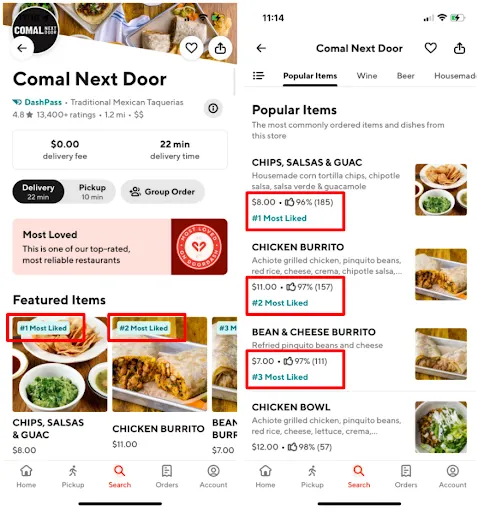
With “most-liked” items, we’re making it easy for customers to discover new dishes and restaurants when looking for something to eat. When browsing your store page, customers can now see the top three “most-liked” items on your menu by your DoorDash customers. Top items are shown with the ‘thumbs up’ ratings.
FAQs
1. How do “most-liked” items work?
How do customers submit “most-liked” items?
Customers who place an order from your store on DoorDash will be given the option to like or dislike (‘thumbs up’ or ‘thumbs down’) the menu items from their most recent order. Customers will be prompted to submit these item ratings (along with a star rating and a public review for your store) the next time they open their DoorDash app, or by visiting your store and selecting ‘Add a Review’.
How are my top 3 “most-liked” items calculated?
Up to three of your menu items can display a “most-liked” label at any given time. In order to qualify as a “most-liked” item, at least 75% of an item’s total ratings must be positive (‘thumbs up’) and an item must have at least six positive ratings. The items are ranked by the number of positive ratings, descending.
2. What do I need to do?
Nothing. We’ll encourage customers who order from you on DoorDash to submit item ratings (‘thumbs up’ or ‘thumbs down’) and display them on your DoorDash store page based on the criteria outlined above.
3. Is there a cost to me?
No, there is no cost associated with this feature.
4. Where will customers see “most-liked” items?
Eligible customers in Australia will see “most-liked items” displayed on restaurant store pages when using the DoorDash app on an iOS device or visiting via www.doordash.com.
5. Where can I find the “most-liked” items that customers submit for my store?
At this time, you’ll be able to see a star rating, review, and the items that a customer ordered in Merchant Portal, but will not be able to see if a customer ‘liked’ or ‘disliked’ an item. To find your “most-liked” items, go to the ‘Featured Items’ and ‘Popular Items’ menu sections on your customer-facing DoorDash store page.

6. Can I opt-out of this feature?
No. This feature will be displayed on all restaurant pages in Australia.



