Overview of Reporting in Ads Manager
Ads Manager gives restaurants a centralized view of campaign performance, customer behavior, and overall business results. With real-time insights and downloadable reports, you can monitor performance, identify trends, and make informed decisions about your advertising strategy.
Reporting available in Ads Manager
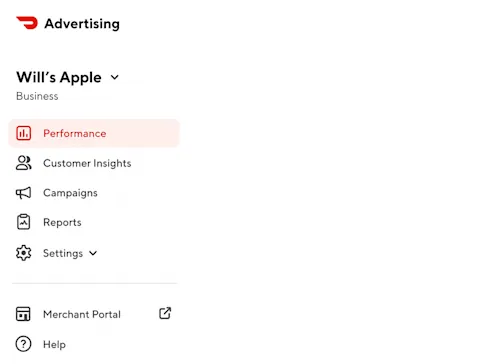
Ads Manager provides two ways to analyze your advertising performance:
Reporting views let you monitor campaign, customer, and business performance directly in Ads Manager.
Report Builder lets you create downloadable Marketing and Business reports for deeper analysis and sharing.
The reporting views available in Ads Manager include:
Performance - Go here to understand your overall business health on DoorDash, including how your ads, promotions, and organic activity are contributing to sales, how you're performing by product and daypart, and how your brand sales growth compares to peers in your category.
Customer insights - Go here to understand who your customers are and how they behave. This tab breaks down your customer base into new, lapsed, and existing customers across ads, promotions, and organic activity, and shows purchase trends and long-term customer value.
Campaigns - Go here to manage and monitor your advertising. You can create new campaigns, see a summary of all active and past campaigns, and click into any individual campaign for more detail.
Reports - Go here when you need to export data or share results with your team. You can create custom reports and access any reports you've previously downloaded.
For instructions on creating downloadable reports, see Ads Manager Report Builder.
These views work together to give a complete picture of how your ads and promotions are driving results. Contact Ads Manager support if you need assistance with any of these views.
How current is the data?
Ads Manager updates performance data on a rolling basis. Sponsored Listings data updates approximately every five minutes; Promotions data updates every three hours.
What to do next
Getting Started with Ads Manager
Ads Manager Report Builder



