DashPass for Employees Guide
In this article
What is DashPass for Employees?
Getting Started
Activation Troubleshooting
FAQ
Contact Us
What is DashPass for Employees?
DashPass for Employees is an organization-sponsored perk that allows eligible participants to subscribe and enjoy the full benefits of a DashPass subscription. A DashPass for Employees plan remains valid until the organization's contractual end date, or until otherwise specified by the organization.
DashPass is a subscription service that offers unlimited deliveries from thousands of eligible restaurants with a $0 delivery fee on orders over $12.
DashPass is currently available in the United States and Canada with some areas excluded. See full terms here.
---
Getting Started
Create a DoorDash account with your organization's approved email address
Go to the home page (www.doordash.com) and click on ‘Sign Up’ at the top right of the page. From there, follow the instructions and fill in all the information that is prompted.
Once this has been completed, enter in your delivery address.
If you haven't been prompted to already, click the menu button on the top left of the page and head to the 'Payments' tab to enter a valid payment method.
A delivery address and form of payment are necessary before you can place your first order.
Sign up for DashPass for Employees
Once your account has been created, you will be eligible to sign up for DashPass for Employees.
You can complete the DashPass for Employees sign up process by clicking on the pop up message that follows the account creation process. The pop up will confirm that you are eligible for your organization's DashPass for Employees plan and the fee will be covered by your organization. Click "Get DashPass."
If you are not greeted by the popup message, visit the menu section at the top left and click on 'You have free DashPass'
You will see a message that says "Your organization will cover the $9.99 fee." Click 'Get DashPass' to complete the signup process.
After the above has been completed, your DashPass plan is now active and you are able to save on all orders from restaurants that have the DashPass logo:


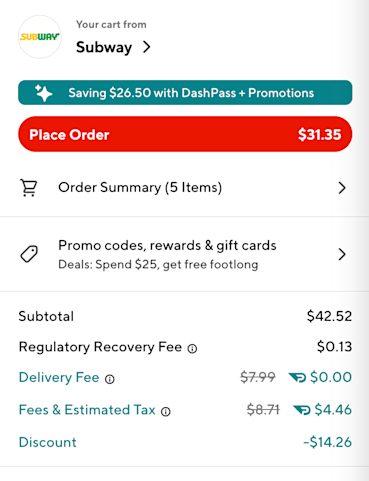
Whenever you order, your checkout page should now show you a flag indicating how much you’ve saved on the order, and you will see that your delivery and other fees have both been reduced:

For more information about DashPass and general troubleshooting, visit our DashPass FAQ.
—
Activation Troubleshooting (For Employees)
Once an admin has added an employee to the Portal, the employee will be sent an email with a link to join and activate their employee benefits. In the email, the employee will need to select ‘Join’ in order to activate their benefits.
If an employee did not receive an email to activate their benefits, please have the employee follow the steps below:
Create a DoorDash account using your work email address and join your team at www.doordash.com/teams/join.
Once signed in, a message will appear confirming that you would like to join your company’s Portal and activate your benefits.
Select ‘Join’ to activate your benefits
Once benefits are activated by the employee, they are immediately available.
Note: You’ll need a valid credit card attached to your account. Make sure that this has been attached to your account prior to signing up for DashPass. If you do not have a valid payment method, click on the menu button at the top left of the page. Scroll down to the ‘Payment’ section and input a valid credit card.
---
FAQ
Q: What email address do I need to use?
A: Your DashPass for Employees subscription is only valid based on what your organization communicates/instructs you to use. That may be a corporate email address or a personal email address. If you’re uncertain, please check with your team’s admin about which email to register with.
If you already have an existing DoorDash account, please create a new account using this email address, as you will not be able to transfer your eligibility in any way.
Q: I got charged for my DashPass for Employees subscription. What should I do?
A: If you’ve been charged for your DashPass for Employees subscription, do not attempt to cancel the DashPass subscription yourself. Please reach out to your DoorDash representative or email us at business-support@doordash.com so we can work with your organization’s Account Manager.
You can expect a refund for the charged amount and an auto-enrollment into your organization’s DashPass for Employees plan.
Q: Why isn’t my DashPass subscription applying to my order?
A: If you don’t see your DashPass subscription applying to your order, please double-check the following:
The restaurant has the DashPass logo

on its banner and/or restaurant page
Your order subtotal is over $12 before taxes and fees
Your DashPass status is ✓Active

If your DashPass subscription has applied successfully to your order, your checkout page receipt will show a flag at the top indicating how much you’ve saved on the order, and you will see that your delivery and other fees have both been reduced.

If you are still having issues with your order, please click here to contact our Live Support.
Q: How will our company be billed for DashPass for Employees?
A: If you are a Self-Serve DoorDash for Business customer and paying with a credit card, your credit card will be charged monthly for the amount of active/enrolled DashPass users for the previous month. Please check our Payment Methods page for more information.
If you are on invoicing, please check the DashPass for Employees section of our Invoicing Guide page for a breakdown of how your company will be billed.
---
Contact Us
For further assistance, please reach out to your DoorDash representative, or email us at business-support@doordash.com. For time-sensitive issues, call (855) 830-5429.
For help with a live order, click here to contact our live support.



