Enhance Your Menu Photos with Smart Photo Tools
Learn how to use AI Photo Enhance in the Merchant Portal to quickly improve your menu photos and create a more polished storefront on DoorDash.
Updated: May 20, 2026
In this article, you’ll get answers to the questions:
What is AI Photo Enhance?
What photo enhancement tools are available?
How do I access AI Photo Enhance in the Merchant Portal?
How do I enhance a menu photo?
What is AI Photo Enhance?
AI Photo Enhance is a smart tool with three photo enhancement modes in the Merchant Portal that helps improve the quality and consistency of your menu photos. With just a few taps, you can clean up backgrounds, improve lighting, sharpen image quality, and create a more professional-looking menu – all while preserving the appearance of your food.
Great photos help customers feel confident about what they’re ordering and can help your menu stand out.
AI Photo Enhance is available directly in the Merchant Portal on web, Android, and iOS.

How do I access AI Photo Enhance in the Merchant Portal?
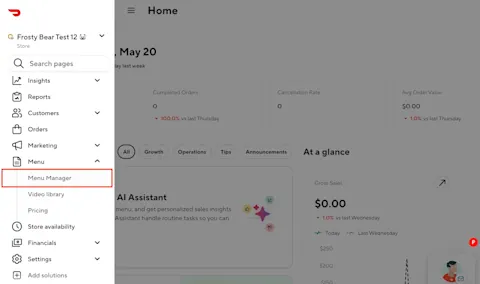
1. Go to the left-side navigation on your Store Page on the Merchant Portal → Menu Manager
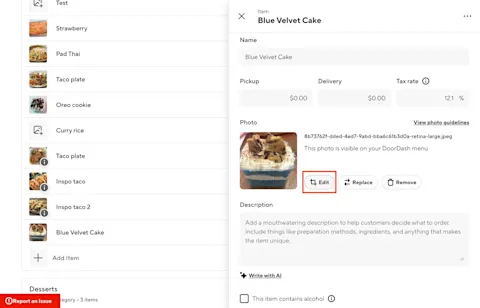
2. Select an existing menu photo and click on edit
3. Select AI Retouch
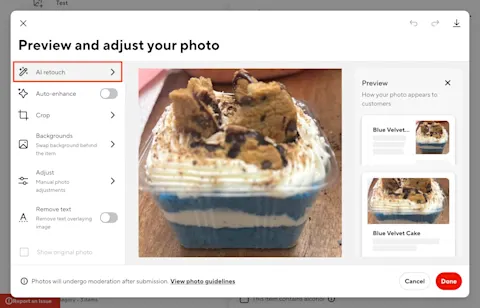
How do I enhance a menu photo?
1. Select the photo you want to edit and select AI Retouch
Choose one of the available enhancement modes:
AI Retouch - keeps the original dish; cleans up background, lighting, sharpness
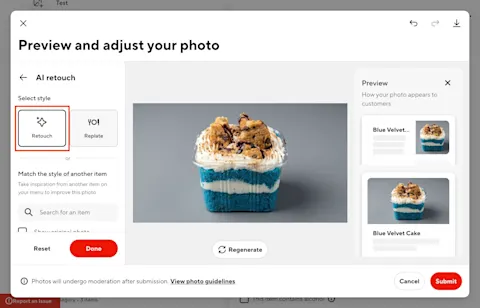
AI Replate - re-stages the dish on premium dinnerware with polished plating
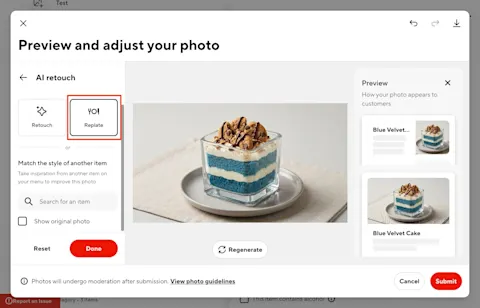
Match Style - applies the look (lighting, color, background) of a reference photo to the dish
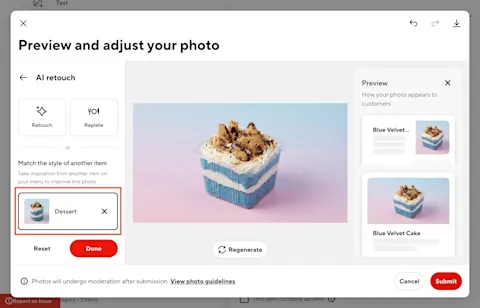
2. Preview the enhanced image
3. Submit the updated photo
4. Enhanced photos will continue to go through DoorDash’s standard moderation and photo review process
5. If approved, the enhanced photo will be displayed on your menu
6. If you're not satisfied with the enhanced result, click reset to return to the original image and try again
Why do menu photos matter?
High-quality menu photos can help:
Increase customer confidence
Improve menu engagement
Create a more visually appealing storefront
Help customers discover new items
AI Photo Enhance makes it easier to create polished menu photography without needing professional editing tools or a photo shoot.



