Sponsored Products and Sponsored Brands Targeting Capabilities
Targeting determines which consumers see your Sponsored Products and Sponsored Brands ads on DoorDash.
By selecting the right targeting options, you can reach more relevant audiences, align campaigns with your strategy, and improve overall campaign performance.
How to set targeting
To configure targeting in Brand Center:
Open your campaign
For Sponsored Products, navigate to the "Ad Group" tab. For Sponsored Brands, navigate to the “Products and Targeting” tab.
Select your targeting options based on your campaign goals
Use the Audience Reach Estimator to evaluate reach
Adjust targeting to balance scale and precision
Targeting capabilities available
Targeting capabilities available for Sponsored Products and Sponsored Brands:
Targeting capability | Geo | Sponsored Products | Sponsored Brands |
Dayparting | US, Canada, Australia | Yes, Custom Bidding | Yes |
Keyword Targeting | US, Canada, Australia | Yes, Custom Bidding
| No |
Behavioral Targeting | US only | Yes | Yes |
Retailer Targeting | US only | Yes, non-Alcohol categories | Yes |
Dish Interest Targeting | US only | Yes | Yes |
Dayparting (Sponsored Products and Sponsored Brands)
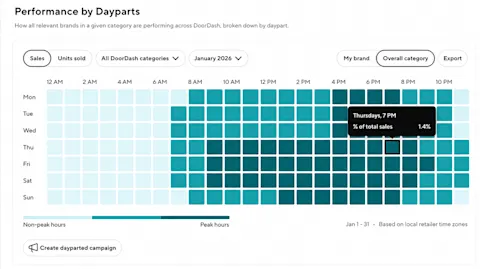
Dayparting allows you to control when your ads are eligible to run throughout the day.
You can schedule ads during specific time windows (e.g., 9 am–12 pm or 3–8 pm) based on when your category or products are most relevant. Please note, Dayparting uses the local time of where the user is shopping.
This is useful for:
Aligning campaigns with peak demand periods
Improving efficiency by focusing spend on high-conversion times
We recommend starting with an always-on campaign to understand budget sufficiency, and then later testing into dayparting to optimize performance and reach.
Keyword targeting (Sponsored Products only)

Keyword targeting allows you to choose or exclude keywords to reach shoppers based on their search behavior and align your ads with customer intent. Available for custom bidding campaigns. Automatic bidding only supports keyword exclusion.
With Keyword targeting, you can apply bids to the keywords that matter most, exclude those that aren't relevant, and leverage branded and competitor keywords to protect your brand presence and expand reach.
You can add keywords directly or use DoorDash's recommended keywords, which are surfaced based on how your products appear in search. Apply individual bids to prioritize specific keywords, or use bulk actions to update multiple bids more efficiently.
To refine targeting, you can add negative keywords to prevent your ads from showing on specific searches. Enter keywords you want to exclude in the "Exclude keywords" section. Negative keywords use exact match, so your ads will not appear when shoppers search for those specific terms. Read more about Keyword Targeting here.
Behavioral targeting (Sponsored Products and Sponsored Brands)

Behavioral targeting allows you to reach customers based on past purchase behavior over the last 180 days, at both the brand and/or category level.
This helps you tailor campaigns to different business objectives:
Bought from any of my brands: Select one or more brands from your portfolio with a goal to drive repeat purchase or trial/trade up behavior
Bought from a category (option to exclude your brand): Select a category with a goal to win category share and acquire new customers
Didn't buy from a category: Select a category with a goal to reach new customers and grow total category
Lapsed from a category: Select a category to re-engage inactive customers, grow total category
Because behavioral targeting narrows your audience, it should typically complement a broader, always-on strategy to maintain scale.
Retailer targeting (Sponsored Products and Sponsored Brands)

Retailer targeting allows you to reach loyal shoppers at the specific retailers where your products are sold. This feature gives you greater control and alignment with your retail strategy by enabling you to select from a wide variety of retailers.
When using Retailer targeting, your ads will appear within selected retailers' store homepages and category pages. Retailer Targeting is supported for Sponsored Products (custom and automatic bidding) and Sponsored Brands (custom bidding).
Retailer Targeting is particularly useful when:
Running retailer-specific promotions
Prioritizing key retail partnerships
Before selecting your retailers, confirm that your products are available at each targeted store — ads will not serve for products that aren't carried at the retailers you've selected.
Retailer Targeting is currently not available for Alcohol advertisers.
Dish Interest targeting (Sponsored Products and Sponsored Brands)

Dish Interest targeting allows you to reach high-intent customers based on their demonstrated affinity for specific restaurant dishes and food categories. This feature uses DoorDash's restaurant ordering and engagement data to build actionable, food-based audiences unique to DoorDash Ads. By connecting with consumers through these signals, advertisers can drive stronger engagement, improve media efficiency, and increase conversions.
This targeting connects your products to relevant consumption moments, helping improve engagement and conversion.
For example, you can reach customers interested in:
Breakfast and brunch
Pizza, burgers, or snacks
Coffee, tea, or desserts
These interest signals are derived from actual ordering behavior, making them highly relevant for CPG brands. Use the Interest Insights Report to identify which food categories or dishes have the highest affinity for your brand, and prioritize those segments in your campaigns.
Targeting Stacking (Sponsored Products and Sponsored Brands - US Only)

Targeting Stacking allows you to layer multiple targeting types together within a single campaign or ad group, so you can reach a more precise audience without building a separate campaign or ad group for each targeting type.
You can combine up to five targeting types — Behavioral, Keyword, Retailer, Dish Interest, and Dayparting — in one Sponsored Products or Sponsored Brands campaign or ad group. Layers apply together, which means a customer must meet every condition you select to be eligible to see your ad.
This is useful for:
Reaching your most valuable shoppers with high-intent audiences built around a specific brand goal, such as new customer acquisition or retention
Spending less time managing fragmented campaigns and ad groups
Applying more precise targeting while keeping control of your bids and placements
Because each targeting type you add narrows your reach, we recommend starting with a two-type stack — for example, Keyword targeting as your baseline plus one additional layer aligned to your goal — and using the Audience Reach Estimator to confirm you have sufficient scale before adding more layers.
How to use the Audience Reach Estimator
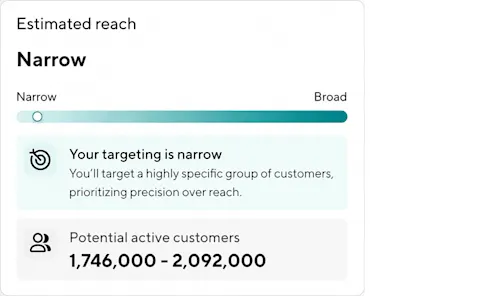
Audience Reach Estimator is a planning tool within Brand Center that provides directional insight into the potential number of active customers your campaign could reach based on your selected targeting and placements. It provides directional reach ranges in real time based on:
Targeting selections
Placement choices
Your reach band helps you understand how restrictive or expansive your targeting selections are:
Broad: large, scalable reach
Moderate: balanced flexibility and specificity
Narrow: may limit performance; consider expanding targeting
Too narrow: very restricted; expansion strongly recommended
This tool is compatible with Behavioral, Interest, and Retailer Targeting.
What to do next
Create a Sponsored Product campaign
Create a Sponsored Brand campaign
Monitor performance and refine targeting over time



